


Page 11 - ATEN Product Series Guide - KVM over IP Matrix System Product Guide
P. 11
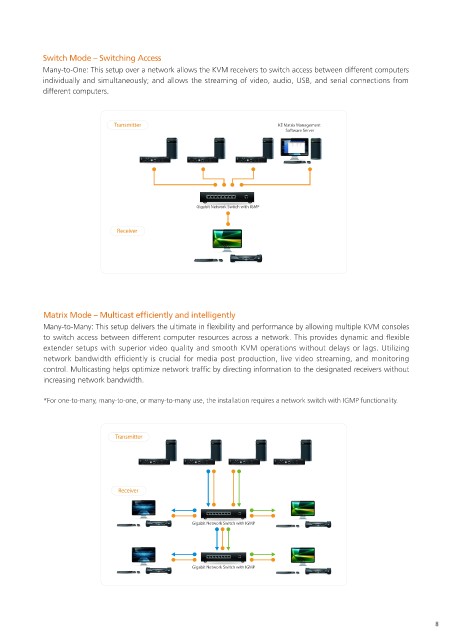
Switch Mode – Switching Access
            Many-to-One: This setup over a network allows the KVM receivers to switch access between different computers
            individually and simultaneously; and allows the streaming of video, audio, USB, and serial connections from
            different computers.


                               Transmitter                                KE Matrix Management
                                                                            Software Server


                                                     Gigabit Network Switch with IGMP

                                Receiver


            Matrix Mode – Multicast efficiently and intelligently
            Many-to-Many: This setup delivers the ultimate in flexibility and performance by allowing multiple KVM consoles
            to switch access between different computer resources across a network. This provides dynamic and flexible
            extender setups with superior video quality and smooth KVM operations without delays or lags. Utilizing
            network bandwidth efficiently is crucial for media post production, live video streaming, and monitoring
            control. Multicasting helps optimize network traffic by directing information to the designated receivers without
            increasing network bandwidth.

            *For one-to-many, many-to-one, or many-to-many use, the installation requires a network switch with IGMP functionality.


                               Transmitter


                                Receiver


                                                    Gigabit Network Switch with IGMP


                                                    Gigabit Network Switch with IGMP


                                                                                                                    8

