


Page 10 - ATEN Product Series Guide - KVM over IP Matrix System Product Guide
P. 10
Flexible Configuration to Meet Your Needs


            The KVM over IP Matrix System is designed for the ultimate in flexibility when setting up and managing
            devices on a network. By utilizing a network connection, we provide a straightforward and easy installation
            process, followed by simple, intuitive management with the CCKM, which allows you to create various types of
            connections. Customized connections can be defined by you and set with user and group access permissions.


            Extender Mode
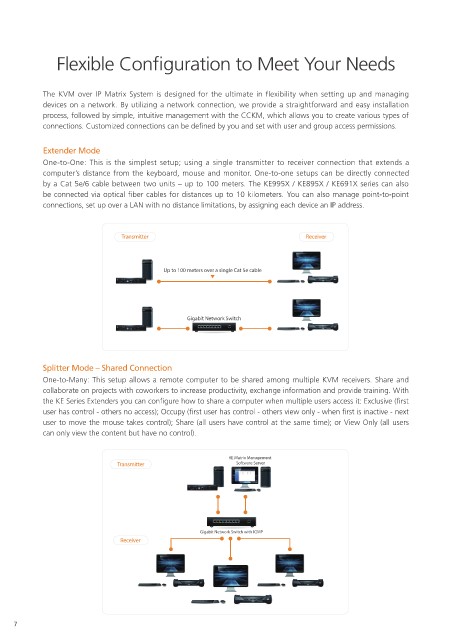
            One-to-One: This is the simplest setup; using a single transmitter to receiver connection that extends a
            computer’s distance from the keyboard, mouse and monitor. One-to-one setups can be directly connected
            by a Cat 5e/6 cable between two units – up to 100 meters. The KE995X / KE895X / KE691X series can also
            be connected via optical fiber cables for distances up to 10 kilometers. You can also manage point-to-point
            connections, set up over a LAN with no distance limitations, by assigning each device an IP address.


                                 Transmitter                                      Receiver


                                            Up to 100 meters over a single Cat 5e cable


                                                  Gigabit Network Switch


            Splitter Mode – Shared Connection
            One-to-Many: This setup allows a remote computer to be shared among multiple KVM receivers. Share and
            collaborate on projects with coworkers to increase productivity, exchange information and provide training. With
            the KE Series Extenders you can configure how to share a computer when multiple users access it: Exclusive (first
            user has control - others no access); Occupy (first user has control - others view only - when first is inactive - next
            user to move the mouse takes control); Share (all users have control at the same time); or View Only (all users
            can only view the content but have no control).


                                                             KE Matrix Management
                                Transmitter                    Software Server


                                                      Gigabit Network Switch with IGMP
                                 Receiver


     7

